One of the biggest breakthroughs in modern AI systems is tool calling.
Instead of simply generating text, AI models can now:
- execute functions,
- call APIs,
- query databases,
- interact with external systems,
- automate workflows,
- and perform real actions.
This transforms AI systems from:
- passive chat interfaces
into:
- active software agents.
Tool calling sits at the center of modern AI engineering frameworks like:
- PydanticAI
- LangChain
- LangGraph
Understanding tool calling is essential if you want to build:
- AI agents,
- workflow automation systems,
- retrieval pipelines,
- autonomous assistants,
- and production-ready AI applications.
This article explains:
- what tool calling is,
- how it works,
- why it matters,
- and how Python developers can use it effectively.
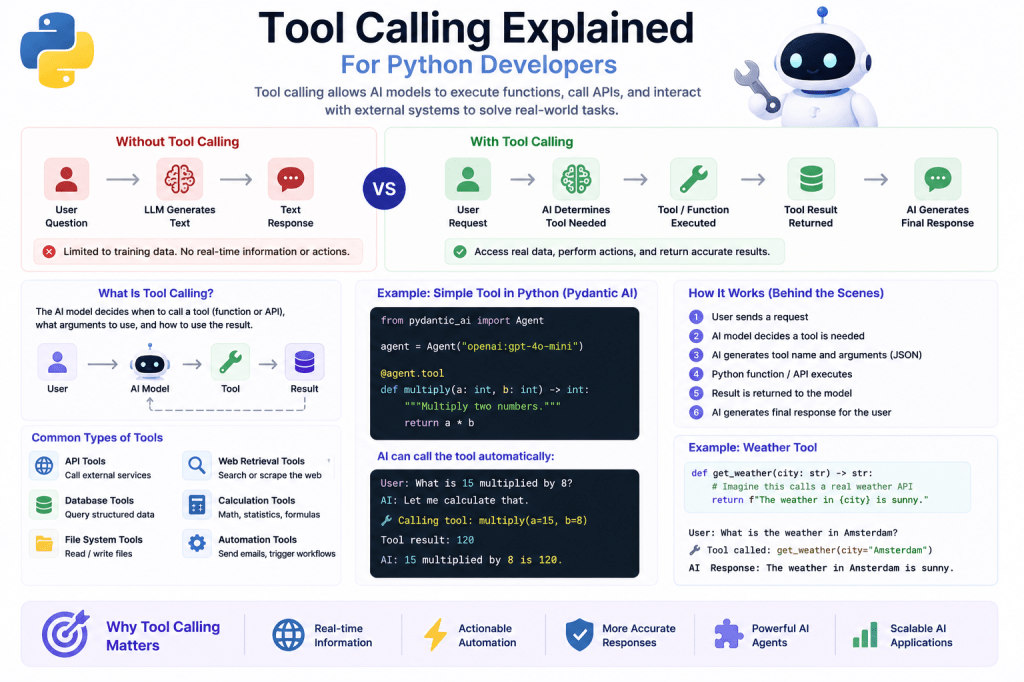
What Is Tool Calling?
Tool calling allows an AI model to request the execution of external functions or systems.
Instead of answering only with text, the model can say:
“I need to use a tool to complete this task.”
Examples:
- check weather data,
- search a database,
- send an email,
- calculate values,
- retrieve documents,
- call APIs,
- or execute business logic.
The AI becomes capable of interacting with software systems.
Why Tool Calling Matters
Without tool calling, AI systems are limited to:
- reasoning,
- text generation,
- and static knowledge.
They cannot:
- access live information,
- interact with applications,
- or execute actions.
Tool calling changes this completely.
It enables AI systems to:
- become interactive,
- dynamic,
- and operational.
AI Without Tool Calling
Traditional chatbot workflow:
User Question ↓LLM Generates Text ↓Response Returned
The AI can only respond using:
- training data,
- reasoning,
- and prompt context.
No external execution occurs.
AI With Tool Calling
Tool-calling workflow:
User Request ↓AI Determines Tool Needed ↓Function/API Executed ↓Tool Result Returned ↓AI Generates Final Response
Now the AI can:
- interact with the outside world,
- retrieve real-time information,
- and automate workflows.
Simple Example
Suppose a user asks:
"What is the weather in Amsterdam?"
Without tool calling:
- the AI guesses based on training data.
With tool calling:
- the AI calls a live weather API.
This creates:
- accurate,
- real-time,
- and dynamic responses.
Tool Calling Feels Like Function Execution
For Python developers, tool calling is easiest to understand as:
- AI-driven function execution.
Example function:
def get_weather(city: str) -> str: return f"The weather in {city} is sunny."
The AI decides:
- when to call the function,
- what arguments to pass,
- and how to use the result.
Why This Is a Major Shift
Early AI systems mostly generated text.
Modern AI systems can now:
- reason,
- decide,
- act,
- retrieve,
- and execute.
This creates much more powerful architectures.
Tool calling is one of the foundations of modern AI agents.
Tool Calling in Pydantic AI
PydanticAI strongly supports typed tool calling.
This means:
- tool inputs,
- outputs,
- and validation
can all be structured using Pydantic models.
This creates safer and more reliable workflows.
Basic Tool Example
Example:
from pydantic_ai import Agentagent = Agent("openai:gpt-4o-mini")@agent.tooldef multiply(a: int, b: int) -> int: return a * b
Now the AI can call:
multiply(5, 10)
automatically when needed.
What Happens Internally?
Behind the scenes:
User Prompt ↓Model Detects Need for Tool ↓Tool Arguments Generated ↓Python Function Executes ↓Result Returned to Model ↓Final Response Generated
The AI orchestrates the workflow dynamically.
Tool Calling vs Prompt Engineering
Traditional prompting:
Pretend you can calculate this.
Tool calling:
Actually execute the calculation.
This difference is enormous.
Tool calling moves AI systems from:
- simulated reasoning
to:
- real execution.
Common Types of Tools
AI systems can interact with many kinds of tools.
1. API Tools
Call external services.
Examples:
- weather APIs,
- stock APIs,
- payment systems,
- CRM platforms.
2. Database Tools
Query structured data.
Examples:
- SQL databases,
- vector databases,
- analytics systems.
3. File System Tools
Read and write files.
Examples:
- documents,
- reports,
- spreadsheets,
- PDFs.
4. Web Retrieval Tools
Access external information.
Examples:
- web search,
- scraping,
- retrieval pipelines.
5. Calculation Tools
Perform reliable computations.
Examples:
- math,
- statistics,
- business calculations.
6. Automation Tools
Trigger workflows.
Examples:
- sending emails,
- scheduling tasks,
- updating systems.
Why Typed Tool Calling Matters
Untyped tools can become dangerous quickly.
Suppose an AI sends:
{ "price": "around 100 dollars"}
But your API expects:
price: float
This can break systems.
Typed validation prevents many of these failures.
Pydantic Models and Tool Safety
Example:
from pydantic import BaseModelclass WeatherRequest(BaseModel): city: str
Now tool inputs become:
- validated,
- typed,
- and predictable.
This dramatically improves reliability.
Tool Calling Enables AI Agents
Without tools:
- AI systems mostly generate text.
With tools:
- agents can act.
This is one reason tool calling became foundational for:
- autonomous agents,
- workflow systems,
- and AI automation.
Example AI Agent Workflow
Example:
User:"Find the latest AI news and summarize it."
Possible workflow:
AI Agent ↓Web Search Tool ↓Retrieve Articles ↓Summarization Tool ↓Final Structured Report
This becomes much more powerful than simple prompting.
Tool Calling and Retrieval-Augmented Generation (RAG)
RAG systems rely heavily on tools.
The AI may:
- search documents,
- retrieve embeddings,
- query databases,
- and access knowledge stores.
Tool calling orchestrates these actions.
Multi-Step Tool Calling
Advanced agents often:
- chain multiple tools together.
Example:
Search Tool ↓Database Tool ↓Analysis Tool ↓Reporting Tool
This creates sophisticated automation workflows.
Why Python Developers Should Care
Python is one of the best languages for AI orchestration because it already has:
- APIs,
- databases,
- automation libraries,
- async support,
- and backend tooling.
Tool calling connects AI directly into the Python ecosystem.
This is extremely powerful.
Common Beginner Mistakes
1. Treating AI Like a Chatbot Only
Modern AI systems can execute workflows — not just chat.
2. Skipping Validation
Always validate:
- tool inputs,
- outputs,
- and schemas.
3. Giving Tools Too Much Power
Be careful with:
- file access,
- destructive actions,
- and sensitive operations.
4. Overengineering Early Projects
Start with:
- simple tools,
- clear workflows,
- and basic orchestration.
Tool Calling and Production AI
Production AI systems increasingly rely on:
- APIs,
- databases,
- retrieval systems,
- automation tools,
- and orchestration pipelines.
Tool calling is the bridge connecting AI reasoning to real-world execution.
Real-World Use Cases
Tool calling powers:
- AI assistants,
- workflow automation,
- customer support systems,
- retrieval systems,
- coding assistants,
- analytics platforms,
- AI dashboards,
- and autonomous agents.
Tool Calling vs Function Calling
These terms are often used interchangeably.
In most cases:
- “tool calling”
means: - AI-driven execution of external functions.
The Bigger Industry Trend
Modern AI development is rapidly moving toward:
- agent systems,
- orchestration frameworks,
- structured outputs,
- and tool-driven execution.
The industry increasingly views LLMs as:
- reasoning engines connected to tools.
This is one of the biggest shifts in AI architecture.
What You Should Learn Next
Recommended next tutorials:
- Building Stateful AI Agents
- AI Output Validation Strategies
- Parsing LLM Responses Safely
- Multi-Agent Architectures Explained
- Retrieval-Augmented Generation (RAG) Explained
These topics build directly on tool-calling systems.
Final Thoughts
Tool calling is one of the most important concepts in modern AI engineering.
It transforms AI systems from:
- passive text generators
into:
- active software agents capable of real execution.
By combining:
- reasoning,
- structured outputs,
- validation,
- and external tools,
developers can build AI systems that:
- retrieve information,
- automate workflows,
- interact with software,
- and execute meaningful actions.
For Python developers, tool calling opens the door to an entirely new generation of AI-powered applications and automation systems.
It is one of the foundational technologies behind modern AI agents.
👉 You can experiment with a practical PydanticAI implementation of this concept in the official GitHub repository for the LearnPydanticAI examples: https://github.com/BenardoKemp/learn-pydantic-ai
 Learn Pydantic AI